CLI 환경을 사용하는 이유
- GUI 프로그램으로는 Git의 모든 기능을 100% 사용할 수 없다.
- 리눅스 서버와 같은 실행 환경에서는 GUI 환경을 사용할 수 없다.
- 작업 속도가 빠르다.
프롬프트(prompt)
$ 기호와 윗줄에 경로된 표시 등을 합쳐 프롬프트 라고 한다.
CLI의 기본적인 정보를 보여준다.
aa @ bb cc ~/Desktop/Programming/iTshirt-cat (main)aa : 내 컴퓨터 사용자의 id
bb : 현재 PC 이름
cc : ~/Desktop/Programming/iTshirt-cat (main) : 현재 디렉터리
~ : c:\User\사용자ID
$ cd # 홈 폴더로 이동

$ cd Documents/ # 내 문서 폴더로 이동

$ pwd # 현재 폴더의 위치 확인
/c/Users/KTDS/Documents
$ mkdir hello-git-cli # 새로운 폴더 생성
$ cd hello-git-cli/ # 폴더로 이동
$ pwd
/c/Users/KTDS/Documents/hello-git-cli$ git status
fatal: not a git repository (or any of the parent directories): .gitgit status로 새로 만든 폴더의 Git 저장소 상태를 확인한다.
.git 폴더가 없기 때문에 Git 작업 폴더가 아니라고 나타난다.
즉, git status 명령은 Git 작업 폴더(워킹트리)에서만 정상적으로 수행되는 명령어이다.
만약 git 프로젝트의 하위 폴더에서 실행되었을 경우에는 정상적으로 git status가 작동되었을 것이다.
git status : Git 워킹트리의 상태를 보는 명령.
-s : git status의 짧은 버전.
$ git init -b main # main 브랜치 초기화 및 git 저장소 생성
Initialized empty Git repository in C:/Users/KTDS/Documents/hello-git-cli/.git/

$ ls -a # 파일 목록 확인
./  ../  .git/

$ git status # 워킹 트리 상태 확인
On branch main

No commits yet

nothing to commit (create/copy files and use "git add" to track)
만든 디렉터리를 Git 저장소로 만든다.
git init -b main : 기본 브랜치를 main으로 지정하고 현재 폴더에 Git 저장소를 생성한다.
git config : git 옵션을 설정해 준다.
$ git config --global user.name # 현재 user.name 확인
4SohyunChoi4
기본 Git 명령어
$ echo "hello git" #화면에 큰 따옴표 안의 텍스트를 보여준다.
hello git

$ echo "hello git" > file1.txt # 텍스트를 file1.txt 파일 생성

$ ls
file1.txt

$ git status
On branch main

No commits yet

Untracked files:
  (use "git add <file>..." to include in what will be committed)
        file1.txt

nothing added to commit but untracked files present (use "git add" to track)
file1.txt가 untracked 상태이다.
$ git add file1.txt
warning: in the working copy of 'file1.txt', LF will be replaced by CRLF the next time Git touches it

$ git status
On branch main

No commits yet

Changes to be committed:
  (use "git rm --cached <file>..." to unstage)
        new file:   file1.txt
git add로 변경 내용을 스테이지에 추가한다.
스테이징: 파일을 스테이지에 올리는 것.
$ git reset file1.txt

$ git status
On branch main

No commits yet

Untracked files:
  (use "git add <file>..." to include in what will be committed)
        file1.txt

nothing added to commit but untracked files present (use "git add" to track)

$ cat file1.txt
hello git
git reset을 통해 스테이지 영역에 있는 파일을 스테이지에서 내린다.
file1.txt는 훼손되지 않은 것을 볼 수 있다.
$ git add file1.txt
warning: in the working copy of 'file1.txt', LF will be replaced by CRLF the next time Git touches it

$ git status
On branch main

No commits yet

Changes to be committed:
  (use "git rm --cached <file>..." to unstage)
        new file:   file1.txt

$ git commit # 커밋 실행, 커밋 메시지를 입력 후 닫아야 한다.
[main (root-commit) 285738a] 첫 번째 커밋 간단하게 hello git이라고 쓴 내용을 커밋함.
 1 file changed, 1 insertion(+)
 create mode 100644 file1.txt
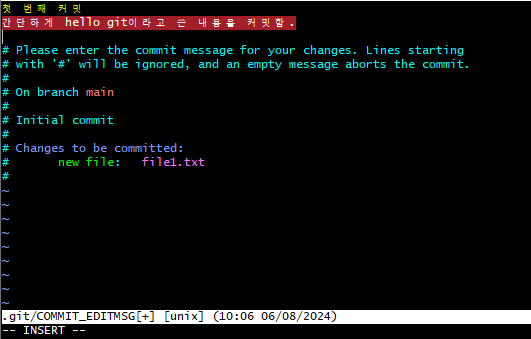
커밋 메시지를 작성한다.
$ git status
On branch main
nothing to commit, working tree clean
워킹 트리와 스테이지 영역이 깨끗해졌다.
git log : 전체 브랜치의 커밋 이력을 보여준다.
git log -n<숫자> : 전체 커밋 중 최신 n개의 커밋만 본다.
git log —oneline —graph —all —decorate : 로그를 간결하게 보여준다.
$ git log --oneline --graph --all --decorate
* 285738a (HEAD -> main) 첫 번째 커밋 간단하게 hello git이라고 쓴 내용을 커밋함.
285738a : 커밋 체크섬 or 커밋 id. SHA1 해시 체크섬 값을 사용한다.
전 세계에서 유일한 값을 가진다.
실제로는 40자리이다.
원격 저장소 관련 Git 명령어
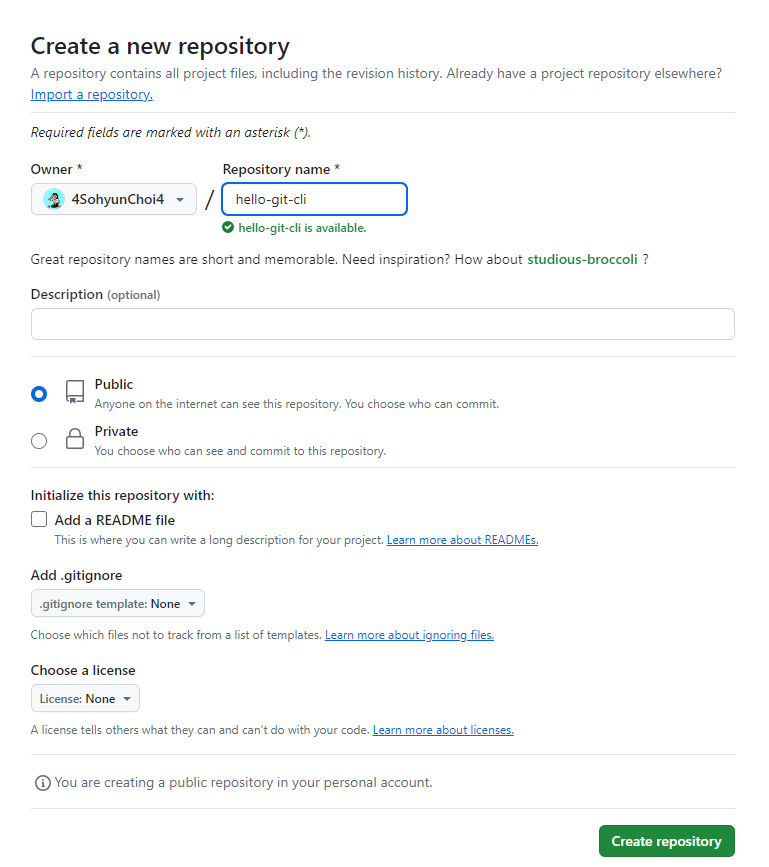
앞에서 만든 로컬 저장소를 기반으로 원격 저장소를 등록한다.
비어있는 프로젝트를 만들어 줘야 클론해 와도 비어 있는 폴더만 생기게 된다.
만약 그렇지 않을 경우 커밋이 충돌이 나므로 그땐 push —force 로 강제 푸시해야 한다.
git remote add <원격 저장소 이름> <원격 저장소 주소> : 원격 저장소 등록
git remote -v : 원격 저장소 목록 살펴보기
$ git remote add origin <https://github.com/4SohyunChoi4/hello-git-cli>

$ git remote -v
origin  <https://github.com/4SohyunChoi4/hello-git-cli> (fetch)
origin  <https://github.com/4SohyunChoi4/hello-git-cli> (push)

$ git push
fatal: The current branch main has no upstream branch.
To push the current branch and set the remote as upstream, use

    git push --set-upstream origin main

To have this happen automatically for branches without a tracking
upstream, see 'push.autoSetupRemote' in 'git help config'.
git push를 하게 되면 로컬 저장소의 main 브랜치와 연결된 원격 저장소의 브랜치가 없어서 발생한 오류가 발생하게 된다.
- upstream : upstream branch란, 로컬 저장소와 연결된 원격 저장소를 일컫는다.
$ git push -u origin main
Enumerating objects: 3, done.
Counting objects: 100% (3/3), done.
Writing objects: 100% (3/3), 294 bytes | 147.00 KiB/s, done.
Total 3 (delta 0), reused 0 (delta 0), pack-reused 0
To <https://github.com/4SohyunChoi4/hello-git-cli>
 * [new branch]      main -> main
branch 'main' set up to track 'origin/main'.

$ git log --oneline -n1
285738a (HEAD -> main, origin/main) 첫 번째 커밋 간단하게 hello git이라고 쓴 내용을 커밋함.

$ git push
Everything up-to-date
오류문구에서 나온 git push —set-upstream 대신 줄여서 -u를 사용해도 된다.
$ pwd
/c/Users/KTDS/Documents/hello-git-cli

$ cd ../

$ git clone <https://github.com/4SohyunChoi4/hello-git-cli.git>
fatal: destination path 'hello-git-cli' already exists and is not an empty directory.

$ git clone <https://github.com/4SohyunChoi4/hello-git-cli.git> hello-git-cli2
Cloning into 'hello-git-cli2'...
remote: Enumerating objects: 3, done.
remote: Counting objects: 100% (3/3), done.
remote: Total 3 (delta 0), reused 3 (delta 0), pack-reused 0
Receiving objects: 100% (3/3), done.
이미 hello-git-cli라는 폴더가 있기 때문에 클론에 실패한다.
따라서 [새로운 폴더명] 옵션을 지정해 다시 clone해 본다.
$ cd hello-git-cli2

$ git log --oneline
285738a (HEAD -> main, origin/main, origin/HEAD) 첫 번째 커밋 간단하게 hello git이라고
쓴 내용을 커밋함.

$ git remote -v
origin  <https://github.com/4SohyunChoi4/hello-git-cli.git> (fetch)
origin  <https://github.com/4SohyunChoi4/hello-git-cli.git> (push)
$ echo "second" >> file1.txt #파일에 내용 한 줄 추가
$ cat file1.txt
hello git
second
$ git commit -a #스테이징 없이 바로 커밋
warning: in the working copy of 'file1.txt', LF will be replaced by CRLF the next time Git touches it
[main e0d917a] 두 번째 커밋
1 file changed, 1 insertion(+)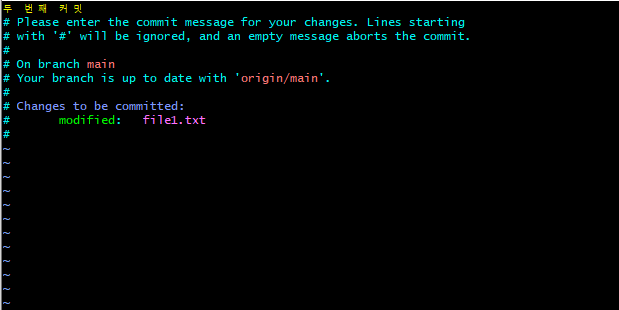
$ git push
Enumerating objects: 5, done.
Counting objects: 100% (5/5), done.
Writing objects: 100% (3/3), 288 bytes | 288.00 KiB/s, done.
Total 3 (delta 0), reused 0 (delta 0), pack-reused 0
To <https://github.com/4SohyunChoi4/hello-git-cli.git>
   285738a..e0d917a  main -> main

$ git log --oneline
e0d917a (HEAD -> main, origin/main, origin/HEAD) 두 번째 커밋
285738a 첫 번째 커밋 간단하게 hello git이라고 쓴 내용을 커밋함.
$ cd ..
$ cd hello-git-cli
$ git log --oneline
285738a (HEAD -> main, origin/main) 첫 번째 커밋 간단하게 hello git이라고 쓴 내용을 커밋함.
$ git pull
remote: Enumerating objects: 5, done.
remote: Counting objects: 100% (5/5), done.
remote: Total 3 (delta 0), reused 3 (delta 0), pack-reused 0
Unpacking objects: 100% (3/3), 268 bytes | 20.00 KiB/s, done.
From <https://github.com/4SohyunChoi4/hello-git-cli>
285738a..e0d917a main -> origin/main
Updating 285738a..e0d917a
Fast-forward
file1.txt | 1 +
1 file changed, 1 insertion(+)
$ git log --oneline
e0d917a (HEAD -> main, origin/main) 두 번째 커밋
285738a 첫 번째 커밋 간단하게 hello git이라고 쓴 내용을 커밋함.
$ cat file1.txt
hello git
second원격 저장소의 변경 사항을 워킹 트리에 반영해 본다.
첫 번째 저장소로 돌아가 git pull 명령어를 실행한다.
'Coding > git' 카테고리의 다른 글
| [사내 스터디 기록] <팀 개발을 위한 Git, GitHub 시작하기> - Ch 6. Github 100% 활용하기 (0) | 2024.07.29 |
|---|---|
| [사내 스터디 기록] <팀 개발을 위한 Git, GitHub 시작하기> - Ch 4. 둘 이상의 원격 저장소로 협업하기 (0) | 2023.09.10 |
| [사내 스터디 기록] <팀 개발을 위한 Git, GitHub 시작하기> - Ch 3. 여러 명이 함께 Git으로 협업하기 (0) | 2023.09.05 |
| [사내 스터디 기록] <팀 개발을 위한 Git, GitHub 시작하기> - Ch 0. 빠른 실습으로 Git, Github 감 익히기 (0) | 2023.08.20 |
| 작년과 올해, 깃 변화 (0) | 2021.12.31 |